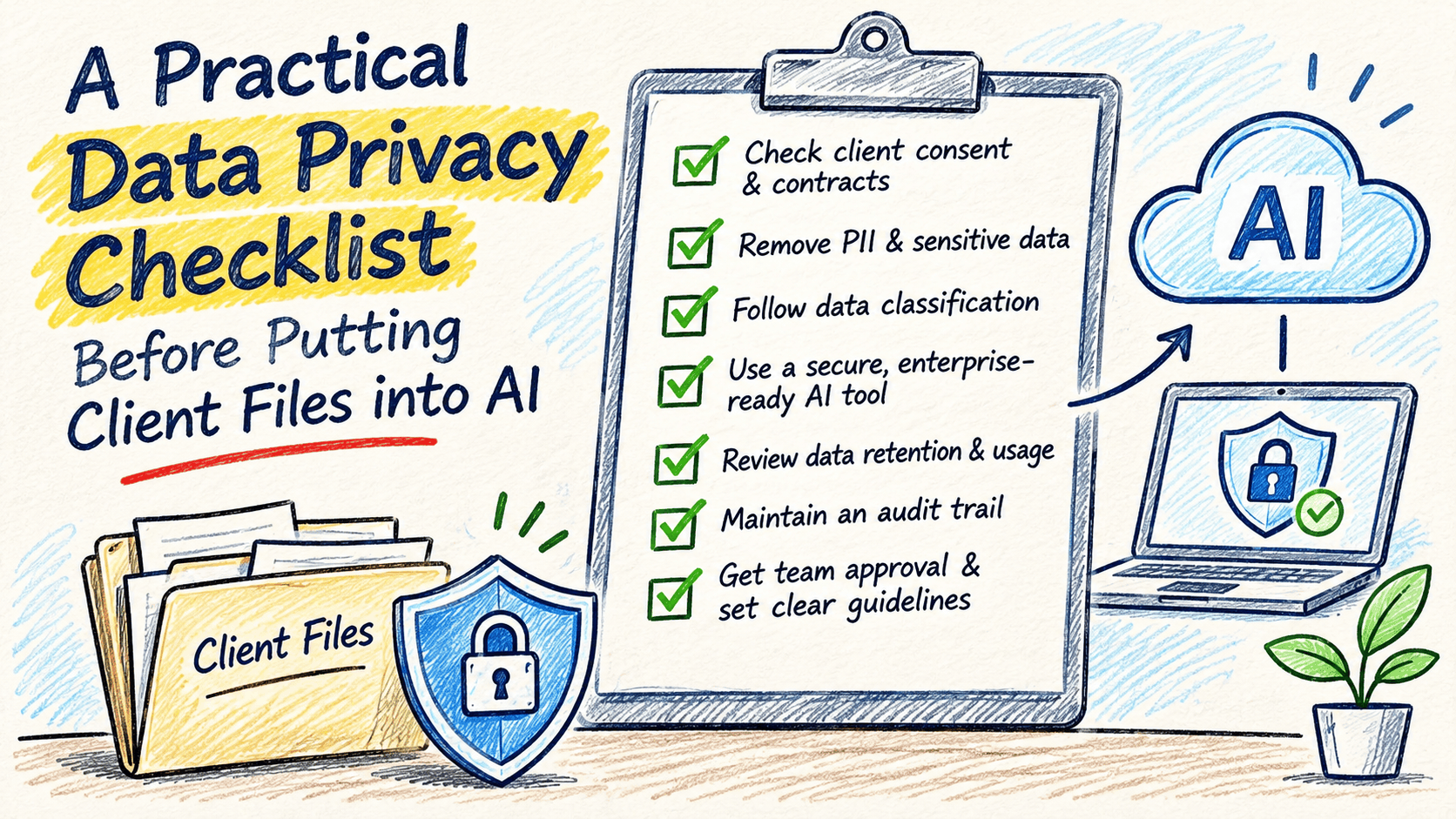
A Practical Data Privacy Checklist Before Putting Client Files into AI

A Practical Data Privacy Checklist Before Putting Client Files into AI
Introduction: Think Before You Upload
Artificial intelligence has made everyday business tasks significantly easier. Professionals now use AI tools to summarize contracts, analyze spreadsheets, review proposals, generate reports, extract information from PDFs, and prepare client presentations.
However, there is one important question that often gets overlooked:
Is it safe to upload your client’s confidential information into an AI tool?
A document that appears harmless may contain customer names, phone numbers, financial records, employee information, business strategies, contract terms, intellectual property, or other sensitive information.
Once this information is uploaded to an external AI platform, its handling depends on the provider’s policies, account configuration, contractual commitments, and technical controls.
For consultants, freelancers, software development companies, agencies, and enterprise teams, protecting client information is not optional.
The good news is that you do not need to stop using AI. You need a simple and repeatable data privacy process before sharing any client files.
This guide provides a practical data privacy checklist that businesses can adopt before uploading documents, spreadsheets, presentations, source code, or other client information into AI applications.
1. Understand What Information Your Client File Contains
Before uploading any document, identify the type of information it contains.
Not all business documents carry the same level of risk.
For example, uploading a publicly available product brochure is very different from uploading a customer database or an employee salary spreadsheet.
Start by classifying your documents into four categories.
| Data Category | Examples | Recommended Approach |
|---|---|---|
| Public | Published brochures, public reports, website content | Generally suitable for approved AI tools |
| Internal | Internal procedures, team documentation | Use approved business AI environments |
| Confidential | Client proposals, contracts, financial reports | Require authorization and appropriate security controls |
| Restricted | Passwords, credentials, personal records, sensitive customer data | Do not upload unless a specifically approved and legally compliant process permits it |
Practical tip: Create a simple document classification policy for your organization. Employees should know which files can be shared with AI and which must remain within approved internal systems.
2. Obtain Client Consent Before Uploading Files
One of the most important steps is confirming whether your client permits the use of AI tools to process their information.
A client may have contractual restrictions covering:
- Confidential business information.
- Customer and employee records.
- Intellectual property.
- Financial and commercial documents.
- Third-party information.
- External cloud services and AI platforms.
Review the agreement, NDA, data processing agreement, and applicable AI usage policies before uploading anything.
Where necessary, obtain written approval from the client.
Example: If you are developing an enterprise solution and need AI to analyze the client’s architecture documents, confirm whether those documents can be processed using an external AI service or whether an approved private environment is required.
Never assume that access to a client document automatically gives you permission to upload it to another service.
3. Remove Personally Identifiable Information (PII)
Personally Identifiable Information (PII) is information that can identify an individual directly or indirectly.
Examples include:
- Full names.
- Email addresses.
- Phone numbers.
- Residential addresses.
- Government identification numbers.
- Bank account details.
- Employee identifiers.
- Customer reference numbers.
Before uploading a document, determine whether this information is necessary for the AI task.
If it is not required, remove or replace it.
For example:
Original information:
Customer Name: Rahul Sharma
Email: rahul@example.com
Phone: 9876543210
Order Value: ₹75,000
Anonymized information:
Customer ID: CUSTOMER_001
Email: [REDACTED]
Phone: [REDACTED]
Order Value: ₹75,000
This allows AI to analyze transaction patterns without exposing unnecessary customer information.
Remember that removing names alone does not always anonymize a document. Combinations of dates, locations, unique identifiers, and other attributes may still identify someone.
Use proper anonymization where appropriate and pseudonymization when the information remains potentially identifiable.
4. Check Whether the AI Platform Uses Your Data for Training
Different AI providers offer different data handling arrangements.
Some consumer services may have settings that govern whether conversations are used to improve models. Business and enterprise offerings may provide different contractual protections and data retention arrangements.
Before uploading client files, verify:
- Whether submitted data is used for model training.
- Whether training can be disabled.
- How long prompts and uploaded documents are retained.
- Whether human reviewers can access submitted content.
- Whether data is shared with third-party service providers.
- Whether the provider offers appropriate business or enterprise data protection commitments.
- Whether data residency requirements can be satisfied.
Do not rely solely on a product’s marketing statement that it is secure.
Read the actual privacy documentation, contractual terms, and data processing agreement applicable to your account.
5. Review Data Storage, Retention, and Deletion Policies
Uploading a document is only one part of the data lifecycle.
You should also understand what happens after the AI task is completed.
Important questions include:
- Where is the uploaded information stored?
- How long does the AI provider retain the information?
- Are uploaded files retained separately from conversations?
- Can administrators control retention?
- Can the information be deleted?
- Are backups subject to separate retention periods?
- Are external integrations retaining copies?
For enterprise projects, document these requirements before selecting an AI platform.
A good practice is to establish a data retention policy that defines how long client documents can remain in AI workspaces and who is responsible for deleting them.
6. Use Secure AI Platforms and Approved Business Accounts
Avoid uploading confidential client information into random AI websites, browser extensions, free online document summarizers, or unapproved applications.
Choose platforms that provide appropriate security and administrative capabilities.
Evaluate the following:
- Encryption in transit and at rest.
- Multi-factor authentication.
- Role-based access control.
- Enterprise identity integration.
- Administrative visibility.
- Data processing agreements.
- Retention controls.
- Audit logging.
- Compliance certifications and independent assurance reports.
- Data residency options, where required.
Examples of commonly used AI ecosystems include ChatGPT Business and Enterprise, Microsoft 365 Copilot, and enterprise AI services from cloud providers.
However, selecting an enterprise product does not automatically make every workflow compliant. Security depends on configuration, permissions, integrations, and contractual arrangements.
7. Check File Metadata and Hidden Information
A document may contain sensitive information beyond its visible content.
For example, Word documents, Excel spreadsheets, PDFs, and PowerPoint presentations can contain:
- Author names.
- Internal comments.
- Revision history.
- Hidden worksheets.
- Tracked changes.
- Embedded objects.
- Hidden slides.
- Internal file paths.
- Document properties.
Before sharing files, inspect and remove unnecessary metadata and hidden content.
For Microsoft Office documents, use the Document Inspector where appropriate.
For PDFs, check document properties, annotations, attachments, and redaction quality.
Important: Drawing a black rectangle over confidential text in a PDF is not the same as securely redacting it. Use a proper redaction function and verify that the underlying information cannot be recovered.
8. Protect Source Code, Credentials, and Technical Architecture
Software development teams frequently use AI assistants for debugging, code reviews, architecture analysis, and documentation.
However, source code can expose sensitive business information.
Never casually upload:
- API keys.
- Database passwords.
- Private SSH keys.
- Access tokens.
- Production connection strings.
- Cloud credentials.
- Private certificates.
- Internal security configurations.
- Proprietary algorithms or intellectual property.
If you need AI assistance with code, remove secrets and replace sensitive configuration values with placeholders.
Example:
Instead of:
DATABASE_PASSWORD=ProductionSecret123
Use:
DATABASE_PASSWORD=[REDACTED]
Also review the code for hardcoded credentials, internal URLs, customer information, and security-sensitive implementation details.
Use secret-scanning tools and approved secure development environments where appropriate.
9. Review Third-Party Integrations and AI Plugins
Modern AI platforms can connect to external applications such as cloud storage, email, CRM systems, project management platforms, and document repositories.
These integrations can make workflows powerful, but they can also expand the amount of information an AI application can access.
Before enabling an integration, ask:
- What information can the integration access?
- Does it have read-only or write permissions?
- Can it access all files or only selected folders?
- Is data transferred to another service?
- Can administrators revoke access?
- Are activities logged?
- Are permissions reviewed periodically?
Apply the principle of least privilege.
Give AI applications access only to the information and actions required for the intended task.
10. Establish Human Review and Approval
AI-generated outputs can contain inaccurate information, expose confidential details, or unintentionally reproduce sensitive content.
A human review process should be mandatory before sharing AI-generated material externally.
For example:
- Review AI-generated reports before sending them to clients.
- Check whether confidential information appears in generated responses.
- Validate financial calculations and customer information.
- Review AI-generated code before deployment.
- Confirm that sensitive documents have not been included in shared outputs.
AI should assist professionals, not replace accountability.
11. Maintain an AI Data Usage Register
Businesses working with multiple clients should maintain a record of approved AI use cases.
A simple register can include:
| Field | Description |
|---|---|
| Client / Project | Client or internal project name |
| AI Platform | Approved AI service |
| Data Category | Public, internal, confidential, restricted |
| Data Owner | Person responsible for the information |
| Purpose | Reason for using AI |
| Approval | Client or internal authorization |
| Retention | Applicable data retention period |
| Review Date | Next privacy and security review |
This creates visibility into how client information is being processed and supports internal governance and audits.
12. Follow Applicable Data Protection Regulations
Data privacy requirements vary depending on where your business operates, where your clients are located, the type of information involved, and the nature of the processing.
Some important frameworks and regulations include:
- India Digital Personal Data Protection Act, 2023: India’s personal data protection framework, together with applicable rules and commencement notifications.
- GDPR: European Union data protection regulation covering personal data processing.
- UAE Personal Data Protection Law: Federal Decree-Law No. 45 of 2021, subject to its scope and applicable exemptions.
- CCPA/CPRA: California privacy laws providing applicable consumer privacy rights.
- ISO/IEC 27001: An international information security management standard.
- ISO/IEC 27701: A privacy information management extension to information security management.
Understand which requirements apply to your organization and the specific client engagement.
For example, a company processing personal information on behalf of a client may have contractual and statutory obligations that differ from those of the AI platform provider.
Consult a qualified privacy or legal professional when the processing involves regulated or sensitive information.
The Practical AI Data Privacy Checklist
Before uploading any client document into an AI application, use this checklist.
Client Authorization
- Confirm that the client permits AI-assisted processing.
- Review NDA and confidentiality clauses.
- Check applicable data processing agreements.
- Obtain written approval where required.
Data Classification
- Identify whether the document contains public, internal, confidential, or restricted information.
- Remove unnecessary personal information.
- Anonymize or pseudonymize information where appropriate.
- Remove passwords, credentials, and access tokens.
AI Platform Security
- Use an approved AI platform.
- Review data training and usage policies.
- Verify encryption and access controls.
- Check retention and deletion policies.
- Review third-party integrations.
- Confirm applicable compliance and data residency requirements.
Document Security
- Remove hidden comments and revision history.
- Inspect document metadata.
- Check hidden worksheets and slides.
- Securely redact sensitive information.
- Scan files for credentials and secrets.
Governance and Monitoring
- Record the AI use case.
- Maintain an approval trail.
- Apply least-privilege access.
- Review AI-generated outputs.
- Delete information according to approved retention requirements.
Golden rule: If you would not email a document to an unknown external recipient, do not upload it to an unapproved AI application.
A Simple Example: Using AI to Analyze a Client Proposal
Consider a technology consulting company that receives a 100-page enterprise proposal from a client.
The team wants to use AI to extract requirements, identify risks, and generate a technical solution summary.
Here is how a privacy-conscious workflow should operate:
Step 1: Classify the document
Determine whether the proposal contains confidential pricing, customer information, intellectual property, or restricted business details.
Step 2: Confirm authorization
Verify that the client agreement permits AI-assisted processing and identify any required restrictions.
Step 3: Prepare the document
Remove unnecessary personal information, credentials, internal comments, and confidential attachments that are not needed for the analysis.
Step 4: Select the AI environment
Use an approved enterprise AI environment with appropriate contractual and technical safeguards.
Step 5: Process minimum necessary information
Upload only the relevant sections required for the specific task.
Step 6: Validate the output
Review the generated requirements, risks, and architecture recommendations for accuracy and confidentiality.
Step 7: Close the data lifecycle
Retain or delete source files and generated outputs according to the client’s contractual requirements and approved retention policy.
This approach enables organizations to benefit from AI without unnecessarily exposing client information.
Conclusion: Make Data Privacy Part of Your AI Workflow
AI adoption is accelerating across consulting, software development, finance, marketing, healthcare, and enterprise operations.
However, successful AI adoption requires more than selecting the right model or writing effective prompts.
Businesses must establish clear data protection practices before allowing AI applications to process client information.
A practical data privacy checklist helps organizations reduce accidental exposure, improve governance, maintain client confidence, and build responsible AI workflows.
Start with three simple principles:
- Never upload client information without checking authorization.
- Share only the minimum information required to complete the task.
- Use approved AI environments with appropriate security, retention, and access controls.
The future belongs to businesses that use AI intelligently while treating data privacy as a fundamental responsibility.
Frequently Asked Questions (FAQs)
1. Is it safe to upload client documents to ChatGPT?
It depends on the type of account, configuration, data involved, applicable contractual terms, and privacy requirements. Review the relevant data controls and obtain client authorization before uploading confidential documents.
2. Should I anonymize client data before using AI?
Yes, where practical and appropriate. Remove direct identifiers and assess whether combinations of remaining information could still identify an individual.
3. Can AI tools store uploaded documents?
AI providers may retain uploaded documents or associated conversation data for different periods depending on the service and its settings. Review the provider’s retention and deletion documentation.
4. Can I upload confidential business proposals to AI?
Only when the client agreement and internal policies permit it, and the selected AI environment provides appropriate security and contractual protections.
5. What information should never be uploaded into public AI tools?
Avoid uploading passwords, private keys, API tokens, banking credentials, sensitive personal records, confidential customer databases, and proprietary information unless a specifically authorized and secured workflow permits the processing.
6. How can small businesses use AI safely?
Start with public or sanitized documents, choose approved AI platforms, establish basic employee guidelines, use MFA, limit access, and review outputs before sharing them externally.
7. What is the difference between anonymization and pseudonymization?
Anonymization removes identifying information so individuals cannot reasonably be identified. Pseudonymization replaces identifiers with alternative values, but re-identification may remain possible using additional information.
Editorial Note: This article provides general operational guidance, not legal advice. Organizations should assess applicable laws, contractual requirements, and provider-specific terms before processing client data.