How to Automate Lead Capture from a Portfolio Website

A portfolio website shouldn’t just showcase your work—it should actively generate business opportunities while you sleep. Whether you’re a freelancer, consultant, software developer, designer, agency owner, or independent professional, automating lead capture can transform a passive portfolio into a reliable client acquisition channel.
The goal is simple: when someone visits your portfolio, shows interest, and reaches out, the system should capture their information, organize it, qualify the inquiry, and notify you automatically—without manually checking every form submission.
Below is a practical guide to building a smart, automated lead capture workflow using affordable tools and AI.Many portfolio websites make the same mistake: they display impressive projects, experience, certifications, and services—but leave the visitor with no frictionless way to start a conversation.
A manual contact form is a good starting point, but an automated workflow can go much further.
Benefits of automated lead capture
- Capture leads 24/7: Collect inquiries even when you’re offline.
- Respond faster: Send an instant acknowledgment when a prospect submits a form.
- Reduce missed opportunities: Store every inquiry in a centralized database.
- Qualify prospects: Identify project type, budget, timeline, and urgency.
- Automate follow-ups: Send reminders if a potential client doesn’t respond.
- Track conversions: Understand which portfolio pages and services attract clients.
- Save time: Eliminate manual copying of contact details into spreadsheets or CRM tools.
The ideal workflow turns a website visitor into an organized business lead in a few seconds.
1. Design a lead capture form that converts
The first step is creating a form that captures the information you actually need without overwhelming visitors.
Avoid asking for too many details. A long form often discourages potential clients from submitting inquiries.
Recommended portfolio lead capture fields
| Field | Purpose |
|---|---|
| Full name | Identify the prospect |
| Email address | Primary communication channel |
| Company name | Understand the business |
| Service required | Identify the type of opportunity |
| Project description | Understand the requirement |
| Estimated budget | Prioritize commercial opportunities |
| Project timeline | Identify urgency |
You don’t necessarily need every field at the beginning. Start with name, email, service category, and a short message.
You can collect budget and timeline later through an automated follow-up email.
Example form CTA
Instead of using generic buttons such as Submit or Contact Me, try more action-oriented messaging:
- Let’s Discuss Your Project
- Request a Consultation
- Get a Project Estimate
- Start a Conversation
- Book a Discovery Call
Your CTA should tell the visitor what happens next.
2. Build your lead capture architecture
A simple automation stack can be created without building a complex backend.
Automated lead capture workflow
1. Portfolio WebsiteVisitor browses services and submits inquiry
2. Form & ValidationCapture details · Validate inputs · Spam protection
3. Automation EngineWebhook · Routing · AI qualification · Workflow rules
4A. CRM / DatabaseStore and categorize leads
4B. NotificationsEmail or instant alerts
5. Automated Follow-UpPersonalized reply · Consultation booking · Reminder
Recommended tools
| Component | Tool options |
|---|---|
| Portfolio website | WordPress, Webflow, Framer, custom React |
| Contact form | Fluent Forms, WPForms, Tally |
| Automation | n8n, Make, Zapier |
| CRM | HubSpot, Zoho CRM, Airtable |
| Database | Google Sheets, Airtable, PostgreSQL |
| AI qualification | OpenAI API |
| Notifications | Gmail, Slack, WhatsApp integrations |
| Scheduling | Calendly, Google Calendar |
You can start with a low-cost combination of WordPress, a form plugin, n8n, and Google Sheets, then upgrade to a CRM when lead volume increases.
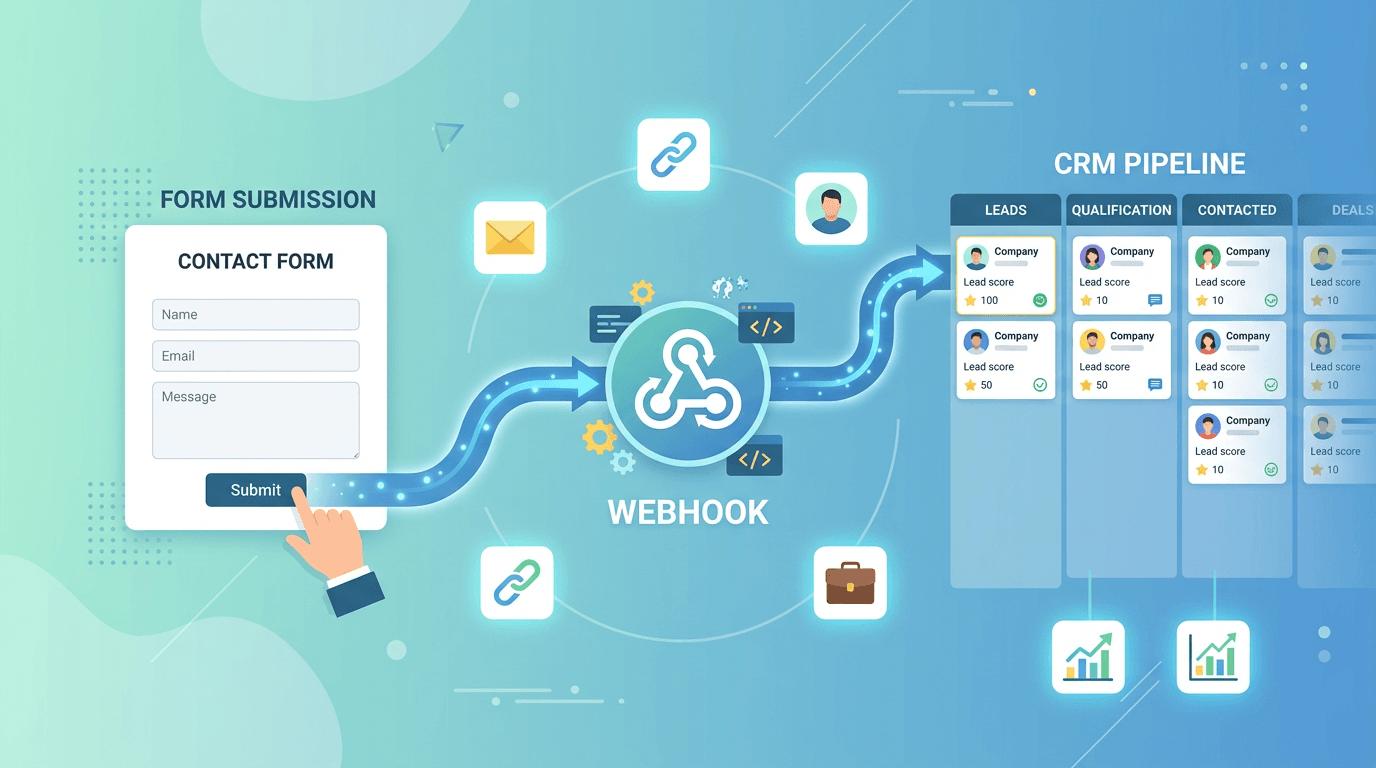
3. Automate form submission using webhooks
The most flexible approach is to send form submissions directly to an automation engine through a webhook.
A webhook is an endpoint that receives data from another system whenever an event occurs. In this case, the event is a portfolio visitor submitting your contact form.
How it works
- Create a webhook in your automation platform.
- Connect the portfolio contact form to the webhook URL.
- Submit a test inquiry.
- Capture the submitted data.
- Validate the information.
- Run the lead qualification workflow.
- Save the record in your CRM or database.
Automated Lead Capture System (Free n8n Workflow)
Example captured lead
{
  "name": "Rahul Sharma",
  "email": "rahul@example.com",
  "company": "ABC Technologies",
  "service": "AI Automation",
  "budget": "5000-10000 USD",
  "timeline": "Within 30 days",
  "message": "We want to automate our customer onboarding process.",
  "source": "portfolio_website",
  "submitted_at": "2026-11-19T10:00:00Z"
}
This structured data makes it easier to automate the next steps rather than treating every inquiry as an unstructured email.
4. Use AI to qualify incoming leads
Not every inquiry represents a potential project. AI can help categorize incoming requests and prioritize which ones deserve immediate attention.
For example, an AI-powered lead qualification step can analyze the inquiry and classify it based on:
- Business relevance
- Requested services
- Estimated project value
- Budget availability
- Timeline
- Potential complexity
- Whether the prospect is ready to schedule a call
Example AI lead classification
| Lead | Budget | Timeline | AI Priority |
|---|---|---|---|
| Enterprise AI implementation | $15,000 | Immediate | High |
| Website redesign inquiry | $2,000 | 3 months | Medium |
| General information request | Not specified | Unknown | Low |
You can define a simple classification system:
- High priority: Clear requirement, realistic budget, immediate timeline.
- Medium priority: Relevant inquiry but incomplete details or a longer timeline.
- Low priority: Unclear requirement, exploratory request, or low commercial intent.
AI should assist with prioritization—not automatically reject prospects based on uncertain assumptions.
Example AI prompt for lead qualification
You are a business lead qualification assistant.

Analyze the submitted portfolio website inquiry.

Evaluate:
1. Service relevance
2. Project clarity
3. Budget readiness
4. Timeline urgency
5. Potential business value

Return:
- Lead category: High, Medium, or Low
- Short summary
- Potential service opportunity
- Recommended next action
- Follow-up email suggestion

Do not invent information that is missing from the inquiry.
This can be implemented as an AI step in n8n or another automation platform.
5. Automatically save leads to a CRM or database
Every form submission should create a centralized lead record.
Without a centralized system, inquiries end up scattered across inboxes, WhatsApp messages, spreadsheets, and notifications.
A simple lead management table could contain:
| Field | Example |
|---|---|
| Lead ID | LEAD-2026-001 |
| Name | Rahul Sharma |
| rahul@example.com | |
| Company | ABC Technologies |
| Service | AI Automation |
| Source | Portfolio Website |
| Priority | High |
| Status | New |
| Created Date | 19 Nov 2026 |
| Next Action | Schedule discovery call |
Suggested lead statuses
- New
- Contacted
- Discovery Scheduled
- Proposal Sent
- Negotiation
- Won
- Lost
- Follow-up Required
This gives you a simple pipeline without needing a complicated sales platform.
6. Send instant personalized email responses
Speed matters when someone is interested in your services. An automated confirmation makes the experience more professional and reassures the visitor that their inquiry has been received.
Hi {{First Name}},
Thank you for reaching out and sharing details about your project.
I’ve received your inquiry regarding {{Service / Project Type}} and will review the information you’ve provided.
If your project requires a deeper discussion, we can arrange a short discovery call to understand your objectives, scope, timeline, and potential approach.
You can book a convenient time here: {{Booking Link}}
Looking forward to learning more about your project.
Best regards,
{{Your Name}}
{{Portfolio Website}}
{{Contact Information}}
You can personalize this email using the prospect’s name, service type, and project summary.
7. Create automated follow-up sequences
Many prospects submit an inquiry but don’t immediately schedule a meeting. A structured follow-up workflow can help keep the conversation moving.
Example follow-up automation
Day 0
Instant acknowledgmentConfirm inquiry receipt and share a booking link.
Day 2
Value-driven follow-upShare a relevant case study, solution example, or helpful resource.
Day 5
Soft reminderAsk if the prospect would like to discuss the project further.
Day 10
Final follow-upClose the sequence politely and leave the door open.
Always ensure follow-ups are appropriate, consent-based, and easy to opt out of. Stop the sequence when the prospect replies, books a meeting, or requests no further contact.
8. Send instant notifications for high-value leads
Email notifications are useful, but a high-value inquiry shouldn’t get buried in your inbox.
You can configure your automation to send an immediate notification when a lead meets your qualification criteria.
Example notification
New High-Priority Lead
Name: Rahul Sharma
Company: ABC Technologies
Requirement: AI-powered onboarding automation
Budget: $5,000–$10,000
Timeline: Within 30 days
AI Summary: Potential opportunity to automate customer onboarding and document processing.
Recommended Action: Schedule a discovery call.
You can route high-priority notifications to email, Slack, Microsoft Teams, or WhatsApp, depending on your preferred workflow.
9. Add spam protection and data privacy
Automated lead capture also means automated spam capture if your website is not properly protected.
Implement these safeguards:
- CAPTCHA or invisible bot protection
- Form validation for email addresses
- Rate limiting to prevent repeated submissions
- Duplicate lead detection
- Secure storage of customer information
- Restricted access to CRM and lead records
- Privacy policy explaining how submitted data is