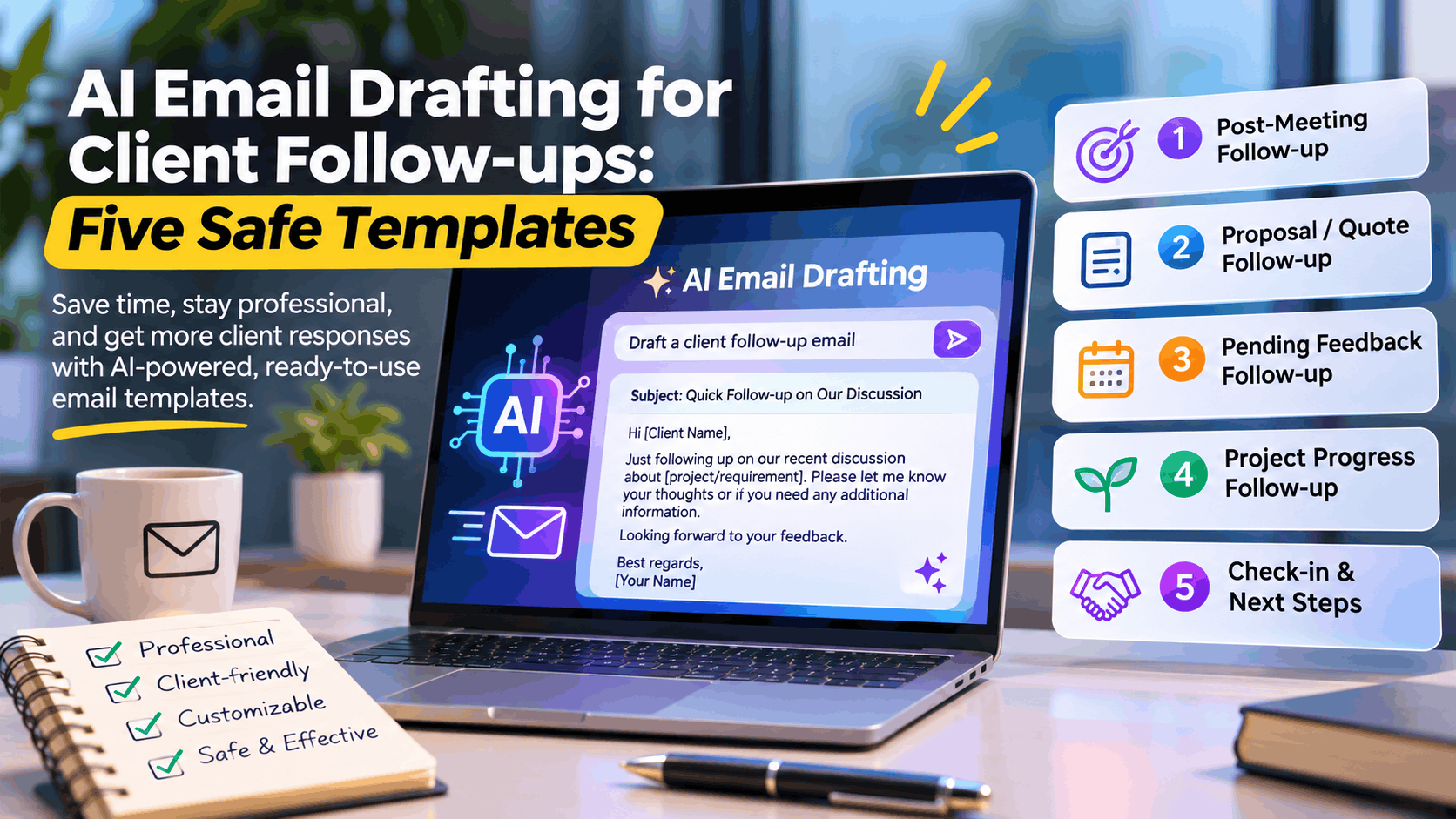
AI Email Drafting for Client Follow-Ups: Five Safe Templates

AI Email Drafting for Client Follow-Ups: Five Safe Templates
Following up with clients is one of those small business tasks that can make a big difference—but it is also easy to postpone. Whether you’re a freelancer waiting for feedback, a consultant following up after a meeting, or an agency trying to keep a project moving, the right email can help maintain momentum without sounding pushy.
AI email drafting tools can make this process faster by helping you structure messages, improve tone, and write professional follow-ups in seconds. However, using AI for client communication requires more than copying and pasting a generated email. You need to protect confidential information, maintain your own voice, and make sure every message reflects the actual situation.
In this guide, we’ll explore five practical and safe AI-generated client follow-up email templates you can adapt for everyday business communication.
Why Use AI for Client Follow-Ups?
AI can help reduce the time spent writing repetitive emails while improving clarity and consistency. Instead of starting from a blank page, you can give an AI tool a short description of the situation and ask it to create a professional draft.
Some common situations where AI email drafting can help include:
- Following up on proposals and quotations
- Requesting feedback after a meeting
- Reminding clients about pending deliverables
- Following up on unpaid invoices
- Keeping clients informed about project progress
The goal isn’t to automate relationships. It’s to automate the repetitive writing process while keeping the communication thoughtful and personal.
How to Use AI Safely for Client Communication
Before using AI to draft client emails, follow a few simple safeguards.
1. Remove sensitive client information
Avoid pasting confidential contracts, personal information, financial account details, passwords, private customer records, or proprietary documents into AI tools unless your organization’s approved AI environment explicitly permits that use.
Use placeholders such as [Client Name], [Project], or [Invoice Number] instead.
2. Verify every factual statement
AI can generate incorrect dates, deadlines, commitments, pricing, or project status details. Check the draft before sending it.
3. Keep your communication authentic
AI should improve your writing—not replace your personality. Adjust the tone so the email sounds like something you would genuinely send.
4. Avoid unnecessary pressure
A follow-up should help the recipient take the next step, not make them feel uncomfortable. Keep requests clear, polite, and proportionate.
5. Review before sending
Treat every AI-generated email as a draft. A quick review for accuracy, tone, privacy, and context is essential.
Template 1: Following Up on a Proposal or Quotation
When to use it: After sending a proposal, quotation, service offer, or business recommendation and waiting for a response.
This email helps reopen the conversation without demanding an immediate decision.
AI prompt you can reuse:
Draft a concise, professional, friendly follow-up email to a client who received my proposal. Ask whether they had a chance to review it, offer to clarify any questions, and invite them to discuss next steps. Keep the tone helpful and non-pushy. Do not invent commitments or deadlines.
Email template:
Subject: Following Up on the Proposal
Hi [Client Name],
I hope you’re doing well.
I wanted to follow up on the proposal I shared regarding [Project or Service]. I hope you’ve had an opportunity to review it.
If you have any questions, would like to explore any adjustments, or need additional details to help with your decision, I’d be happy to discuss them.
Please let me know what works best for you, and we can take it forward accordingly.
Looking forward to hearing from you.
Best regards,
[Your Name]
Why this works: It opens the door for discussion without creating unnecessary pressure or assuming the client has already made a decision.
Template 2: Follow-Up After a Client Meeting
When to use it: After a discovery call, consultation, project discussion, sales meeting, or requirements workshop.
AI can help turn rough meeting notes into a clear summary and action-oriented follow-up.
AI prompt you can reuse:
Write a professional follow-up email after a client meeting using the notes I provide. Summarize the key discussion points, list agreed actions, and identify next steps. Do not add decisions, commitments, dates, or responsibilities that were not present in the notes. Keep the message concise and friendly.
Email template:
Subject: Thank You for the Discussion – [Project Name]
Hi [Client Name],
Thank you for taking the time to connect and discuss [Project or Business Requirement].
Based on our discussion, the key points are:
- [Discussion Point 1]
- [Discussion Point 2]
- [Discussion Point 3]
Next steps:
- [Action Item 1] – [Owner]
- [Action Item 2] – [Owner]
- [Action Item 3] – [Owner]
Please feel free to let me know if I have missed anything or if you would like to make any changes to the above summary.
Looking forward to progressing with the next steps.
Best regards,
[Your Name]
Why this works: A clear written summary reduces misunderstandings, helps both sides stay aligned, and makes it easier to track ownership of actions.
Template 3: Requesting Feedback or Approval
When to use it: When a client needs to review a design, document, deliverable, prototype, content draft, or milestone.
Instead of sending a vague “Any updates?” message, use AI to create a specific request for feedback.
AI prompt you can reuse:
Draft a polite follow-up email requesting client feedback on a deliverable. Mention that their feedback will help us determine the next steps. Include a placeholder for the review deadline if one has already been agreed. Avoid sounding demanding or assuming approval.
Email template:
Subject: Feedback Requested – [Deliverable Name]
Hi [Client Name],
I hope everything is going well.
I’m following up regarding [Deliverable Name] shared on [Date]. When you have a chance, could you please review it and share your feedback?
Your inputs will help us finalize the current stage and plan the next steps more effectively.
If possible, it would be helpful to receive your feedback by [Agreed Date], so we can keep the project timeline aligned.
Please let me know if you need any additional information or would prefer to discuss the feedback over a quick call.
Thank you for your time.
Best regards,
[Your Name]
Why this works: It explains what is needed, why it matters, and when the feedback would be useful—without inventing urgency.
Template 4: Payment or Invoice Reminder
When to use it: When an invoice is due or overdue and you need to send a professional reminder.
Payment reminders should be factual, respectful, and based on verified invoice details. AI can help soften the wording without obscuring the actual payment request.
AI prompt you can reuse:
Write a polite and professional payment reminder for a client. Use only the invoice number, amount, due date, and payment status that I provide. Do not threaten legal action, add late fees, or make claims that are not stated in my instructions. Keep the message respectful and clear.
Email template:
Subject: Payment Reminder – Invoice [Invoice Number]
Hi [Client Name],
I hope you’re doing well.
This is a gentle reminder regarding Invoice [Invoice Number] for [Amount], which was due on [Due Date].
Could you please confirm the payment status or let me know if any additional information is required from my side to help process the payment?
If the payment has already been completed, please disregard this reminder and accept my thanks.
I appreciate your support and look forward to your update.
Best regards,
[Your Name]
Why this works: The message maintains a professional relationship while clearly communicating the outstanding payment request.
Template 5: Project Status or Progress Follow-Up
When to use it: When you want to check progress, communicate an update, or reconnect with a client after a period of inactivity.
This is especially useful for consultants, freelance developers, project managers, and agencies handling long-running engagements.
AI prompt you can reuse:
Draft a professional client follow-up email about the current project status. Use the project information provided, summarize confirmed progress, identify pending dependencies, and suggest the next action. Do not invent progress, dates, or completion estimates. Keep the tone transparent and reassuring.
Email template:
Subject: Project Update and Next Steps – [Project Name]
Hi [Client Name],
I wanted to share a brief update regarding [Project Name] and reconnect on the next steps.
Current status:
[Brief, factual update on completed work]
Pending items:
[Items awaiting feedback, approval, information, or action]
Next steps:
[Planned action based on the confirmed project status]
Please let me know if there have been any changes to your priorities or requirements. If it would be helpful, we can arrange a quick discussion to align on the next phase.
Thanks for your continued collaboration.
Best regards,
[Your Name]
Why this works: It keeps communication active, provides visibility, and makes it easier for the client to respond with specific information.
A Simple AI Workflow for Writing Client Follow-Ups
You don’t need an elaborate automation system to improve client communication. A simple five-step workflow is enough.
Step 1: Identify the purpose
Determine whether you need a proposal follow-up, meeting summary, feedback request, payment reminder, or project update.
Step 2: Provide minimal context
Give the AI only the information required to draft the email. Use placeholders for sensitive information.
Step 3: Generate the draft
Ask the AI to match your preferred tone—professional, friendly, concise, formal, or persuasive without being aggressive.
Step 4: Review and personalize
Verify the facts, add the client’s name, check any dates or amounts, and adjust the wording to sound natural.
Step 5: Send and track
Send the message through your normal email workflow and track any response or action required.
A Reusable Master Prompt for AI Follow-Up Emails
Instead of maintaining separate prompts for every scenario, you can use this general-purpose prompt:
You are a professional business communication assistant. Draft a clear, concise, natural-sounding client follow-up email based on the context I provide.
Purpose: [Proposal follow-up / Meeting summary / Feedback request / Payment reminder / Project update]
Context: [Brief description]
Desired outcome: [What I want the recipient to do]
Tone: Professional, friendly, respectful, and confident
Length: 100–150 wordsGuidelines:
- Do not invent facts, dates, commitments, or promises.
- Avoid aggressive, manipulative, or overly sales-oriented language.
- Keep the email specific and easy to respond to.
- Do not repeat information unnecessarily.
- Use placeholders for confidential or sensitive information.
- Produce a subject line and a ready-to-review email draft.
Can AI Automate Client Follow-Ups Completely?
AI can assist with drafting, categorizing, prioritizing, and even preparing scheduled reminders. However, fully automated client emails can create problems if the system sends incorrect information, misunderstands the conversation, or follows up at the wrong time.
A safer automation model is:
- AI drafts the email.
- Workflow automation selects the appropriate template.
- Business rules determine when a follow-up is appropriate.
- The email is reviewed before sending, especially for payments, commitments, disputes, or sensitive client conversations.
For routine, low-risk communications, more automation may be appropriate if the workflow has been tested and the recipient expectations are clear.
Final Thoughts
AI email drafting for client follow-ups is a practical way to save time, improve communication quality, and reduce the friction of everyday business correspondence.
The biggest benefit isn’t simply writing emails faster. It’s making sure important conversations don’t get forgotten, clients receive clear updates, and every follow-up has a meaningful purpose.
Start with these five templates, customize them to your communication style, and use AI as a writing assistant—not as a substitute for professional judgment.
A thoughtful follow-up can be the difference between a conversation that goes quiet and a business relationship that continues to grow.