A No-Code Automation Map for a One-Person Service Business

A No-Code Automation Map for a One-Person Service Business
SEO Title: A No-Code Automation Map for a One-Person Service Business
Meta Description: Discover how to automate your one-person service business using no-code tools. Build workflows for leads, client onboarding, payments, project delivery, and follow-ups without coding.
Suggested URL Slug: no-code-automation-map-one-person-service-business
Focus Keyword: No-code automation for service businesses
Secondary Keywords: Small business automation, freelancer automation tools, no-code business workflows, solo entrepreneur tools, AI business automation.
Introduction: Run Your Business, Not Your Admin Work
Running a one-person service business sounds attractive. You choose your clients, control your schedule, decide your pricing, and keep the revenue generated by your expertise.
But there is another side to working independently.
You are simultaneously the salesperson, marketing manager, accountant, project manager, customer support executive, and service delivery professional.
A new client sends an enquiry. You respond manually, arrange a discovery call, prepare a proposal, follow up, generate an invoice, collect payment, onboard the client, deliver the project, and request feedback.
Before you realise it, administrative work is consuming more time than the actual service you sell.
This is where no-code automation becomes valuable.
You do not need an expensive enterprise platform, a development team, or advanced programming knowledge. With a combination of simple tools such as Google Forms, Gmail, Google Sheets, Calendly, Make, Zapier, and Notion, you can create a connected business operating system.
The objective is simple:
Automate repetitive work, maintain personal relationships, and spend more time on revenue-generating activities.
Let’s build a practical automation map for a one-person service business.
1. Understand the Business Processes You Need to Automate
Before selecting automation tools, understand the complete customer journey.
Almost every independent service business follows a similar operating cycle.
- Marketing and lead generation.
- Lead capture and qualification.
- Discovery calls and consultations.
- Proposal and quotation management.
- Client onboarding.
- Project execution and delivery.
- Invoicing and payment collection.
- Customer support and communication.
- Feedback, testimonials, and referrals.
- Reporting and business improvement.
Instead of automating every activity independently, connect these processes into a single workflow.
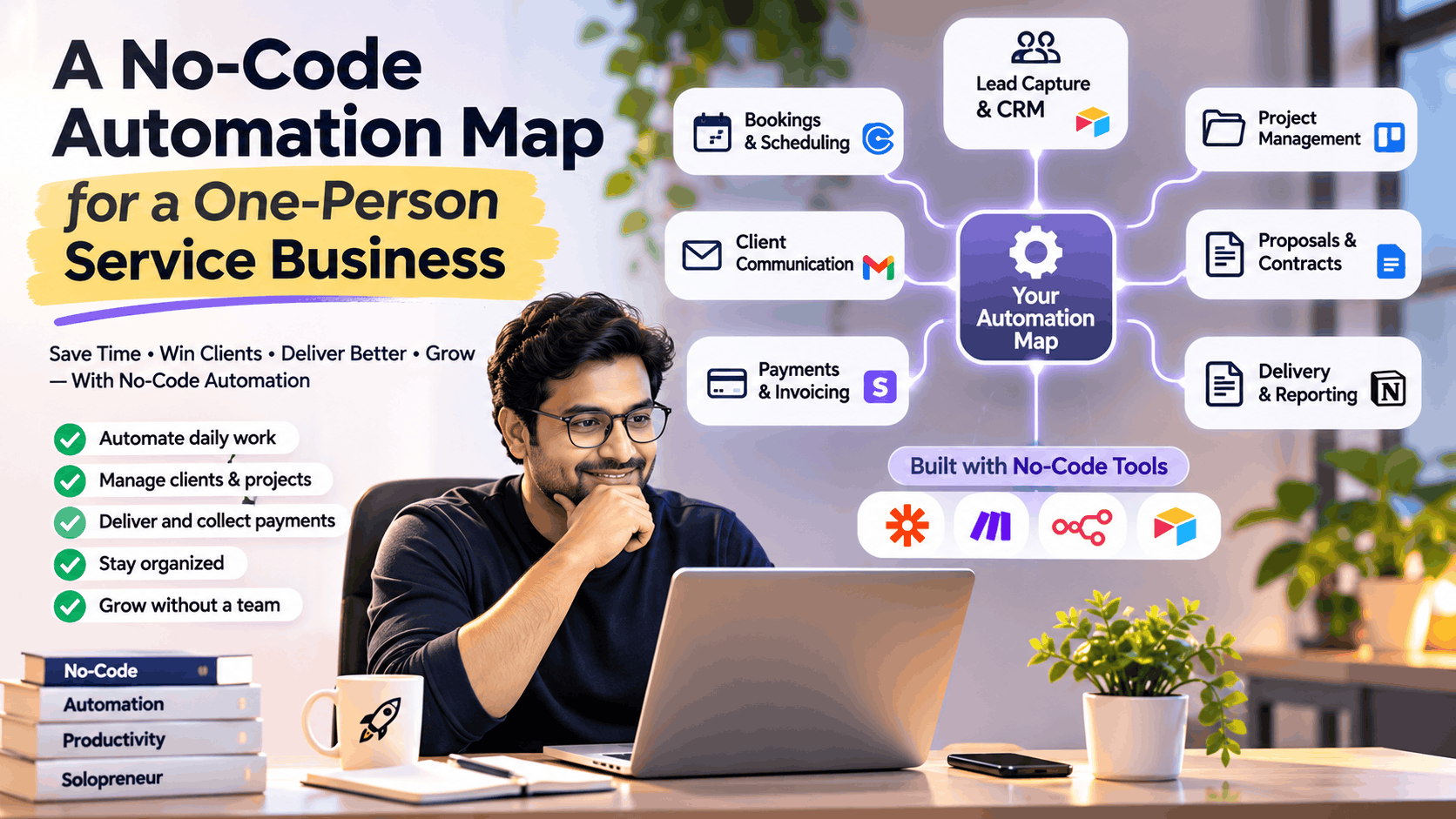
2. The Complete No-Code Automation Map
Here is a simplified architecture for a one-person service business.
Business workflow:
Marketing Channels → Lead Capture → CRM → Automated Follow-up → Discovery Call → Proposal → Client Onboarding → Project Delivery → Invoice & Payment → Feedback & Referral
A practical tool architecture could look like this:
| Business Function | Suggested Tools | Automation |
|---|---|---|
| Website and landing pages | WordPress, Carrd | Enquiry capture |
| Lead generation | LinkedIn, website, social media | Lead collection |
| Lead forms | Google Forms, Tally | Automatic lead registration |
| CRM | Google Sheets, HubSpot | Lead tracking |
| Email communication | Gmail | Automated responses |
| Meeting scheduling | Calendly | Booking confirmation |
| Proposals | Google Docs, PandaDoc | Proposal generation |
| Project management | Trello, Notion | Task creation |
| File management | Google Drive | Folder creation |
| Workflow automation | Make, Zapier, n8n | Connect applications |
| Invoicing | Zoho Invoice, accounting software | Invoice creation |
| Payments | Razorpay, Stripe | Payment notifications |
| Customer feedback | Google Forms | Feedback collection |
| Analytics | Google Sheets, Looker Studio | Business reporting |
You do not need all these tools on day one. Start with the smallest combination that solves your most repetitive tasks.
3. Build the Essential Automation Workflows
Workflow 1: Automatically Capture and Organise New Leads
Problem: Potential customers contact you through multiple channels, and some enquiries get lost.
Solution: Create one central lead collection system.
How it works:
- A visitor submits an enquiry form on your website.
- The form captures name, email, phone number, service requirement, budget, and expected timeline.
- The information is automatically added to Google Sheets or your CRM.
- An acknowledgement email is sent to the prospect.
- You receive a notification about the new enquiry.
- A follow-up task is created.
Recommended tools: Tally or Google Forms + Google Sheets + Make or Zapier + Gmail.
Business benefit: Every enquiry enters a central system without manual data entry.
Workflow 2: Automate Discovery Call Scheduling
Problem: You spend time exchanging emails to find a suitable meeting time.
Solution: Provide prospects with a booking link.
How it works:
- A qualified prospect receives your Calendly link.
- The prospect selects an available slot.
- A calendar event is created.
- Both parties receive confirmation.
- Meeting reminders are automatically sent.
- A discovery-call preparation checklist is created.
Recommended tools: Calendly + Google Calendar + Gmail.
Business benefit: Fewer scheduling emails and fewer missed meetings.
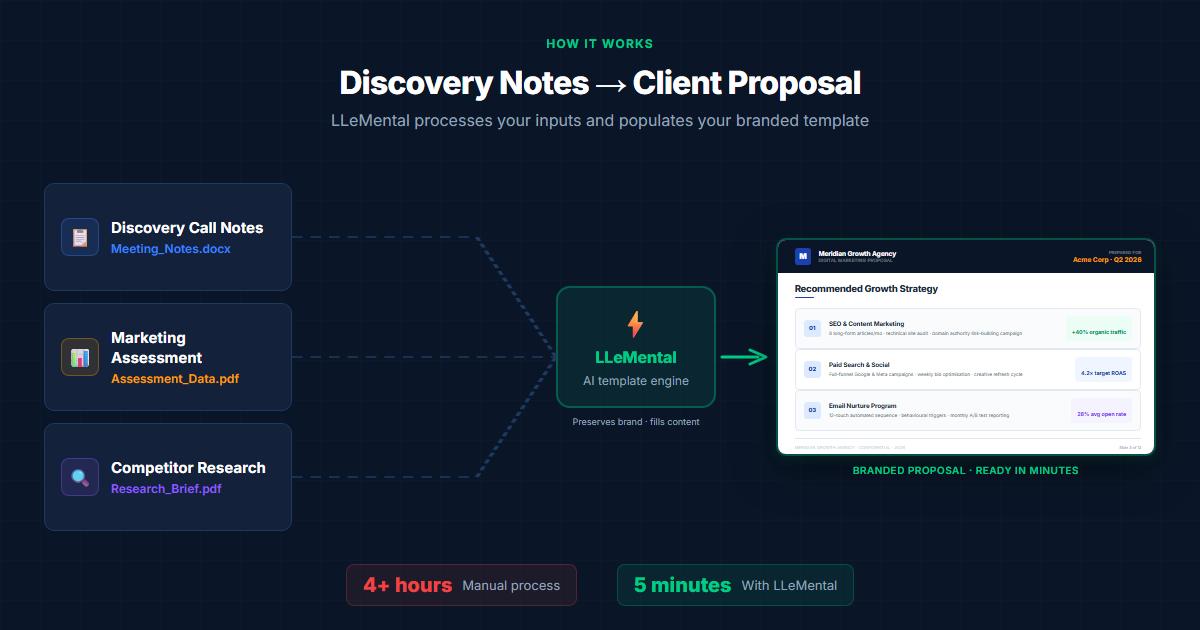
Workflow 3: Generate Proposals Faster
Problem: Preparing proposals repeatedly consumes valuable time.
Solution: Build reusable proposal templates.
Create standard templates containing:
- Client information.
- Business requirements.
- Scope of services.
- Deliverables.
- Project timeline.
- Commercial terms.
- Payment milestones.
- Assumptions and exclusions.
Automation flow:
New Qualified Lead → Proposal Template → Client Details → Proposal Draft → Manual Review → Send to Client.
You can use Google Docs templates with Make or Zapier to populate standard client information.
AI tools can also help convert discovery-call notes into an initial proposal draft. Always review the scope, pricing, commitments, and contractual language before sending it.
Recommended tools: Google Docs + Make + ChatGPT.
Business benefit: Faster proposal preparation and a more consistent client experience.
Workflow 4: Automate Client Onboarding
Problem: Once a client accepts your proposal, you need to collect documents, information, approvals, and project requirements.
Solution: Create an automated onboarding workflow.
When a client confirms the engagement:
- Update the CRM status to Won.
- Create a dedicated client folder in Google Drive.
- Generate a project workspace in Notion or Trello.
- Send a welcome email.
- Share the client intake questionnaire.
- Create initial project tasks.
- Send payment instructions or an advance invoice.
- Notify yourself that onboarding is complete.
Recommended tools: Google Drive + Tally + Notion + Make + Gmail.
Business benefit: A professional onboarding experience without repetitive administrative work.
Workflow 5: Automate Project Management and Delivery
Problem: Managing deadlines, client requests, and deliverables becomes difficult when everything is tracked manually.
Solution: Use an automated project workspace.
Every new project should have:
- Project name and client information.
- Project start and end dates.
- Defined milestones.
- Deliverable checklist.
- Task status.
- Client approval status.
- Pending dependencies.
- Delivery documentation.
Example workflow:
Client Onboarding Completed → Create Project Board → Add Standard Tasks → Assign Due Dates → Send Deadline Reminders → Update Project Status.
You can also trigger an email notification when a milestone is completed.
Recommended tools: Trello or Notion + Make or Zapier.
Business benefit: Better visibility into project progress and fewer missed deadlines.
Workflow 6: Automate Invoices and Payment Reminders
Problem: Tracking invoices and following up on outstanding payments can become uncomfortable and time-consuming.
Solution: Connect project milestones with your invoicing process.
Automation flow:
Milestone Approved → Prepare Invoice → Review Invoice → Send to Client → Record Payment Status → Schedule Due-Date Reminder.
For Indian freelancers and service providers, consider:
- Zoho Invoice for invoicing.
- Razorpay for supported online payment collection.
- Google Sheets for a simple receivables tracker.
Keep GST registration, tax applicability, invoice requirements, and payment reconciliation aligned with your actual business circumstances. Automation should not replace accounting or tax review.
Business benefit: More consistent invoicing and improved payment visibility.
Workflow 7: Automate Customer Feedback and Referrals
Problem: Many independent professionals complete projects without requesting testimonials or referrals.
Solution: Make feedback collection part of your delivery process.
How it works:
- Mark the project as completed.
- Send a thank-you email.
- Share a feedback form.
- Request permission to use a testimonial.
- Record feedback in your CRM.
- Create a follow-up reminder for potential repeat business.
Recommended tools: Google Forms + Gmail + Google Sheets + Make.
Business benefit: Build social proof and generate repeat business through a consistent process.
4. Connect Everything Using a No-Code Automation Platform
Your individual applications need a way to communicate with each other.
This is where workflow automation platforms become important.
Three useful options are:
Make
Make provides visual workflow builders that allow you to connect applications through triggers, actions, filters, and conditional routes. It is particularly useful for multi-step business workflows.
Zapier
Zapier is a popular choice for connecting applications through simple trigger-and-action workflows. It is suitable for beginners who want to automate common business activities quickly.
n8n
n8n provides more flexibility for complex workflows, APIs, and AI-powered automation. It is particularly interesting for technically confident users who want greater control over their automation infrastructure.
Choose one platform initially. Avoid building the same workflow across multiple automation platforms unless there is a clear reason.
5. Add AI to Your No-Code Business Automation
Traditional automation follows predefined rules. AI can add another layer by understanding and processing unstructured information.
Consider these practical applications:
| Business Activity | AI-Powered Automation |
|---|---|
| Lead qualification | Categorise enquiries by service requirement |
| Client communication | Draft personalised email responses |
| Proposal preparation | Convert client briefs into proposal drafts |
| Meeting management | Summarise discovery-call notes |
| Project planning | Generate initial project task lists |
| Content marketing | Generate blog and social media drafts |
| Customer support | Classify incoming questions |
| Business reporting | Summarise monthly performance |
For example, an incoming client enquiry can be passed to an AI model to identify the service requested, extract the budget and timeline, and suggest a lead priority.
The result can then be saved in your CRM for your review.
Important: Do not let AI independently make contractual commitments, approve payments, issue sensitive financial decisions, or send unreviewed high-stakes communications.
6. A Practical 7-Day Implementation Roadmap
You do not need to build the entire system in one weekend.
Start with the following implementation plan.
| Day | Implementation Activity | Expected Outcome |
|---|---|---|
| Day 1 | Map business processes | Identify repetitive tasks |
| Day 2 | Set up enquiry form and CRM | Centralised lead database |
| Day 3 | Connect email and scheduling | Automated enquiry responses and bookings |
| Day 4 | Create proposal and onboarding templates | Standardised client acquisition |
| Day 5 | Set up project management | Automated project creation |
| Day 6 | Connect invoicing and payment tracking | Better financial visibility |
| Day 7 | Add feedback and reporting workflows | Connected business operations |
Start with lead capture, scheduling, and onboarding. These workflows are generally easier to implement and can immediately reduce repetitive administrative work.
7. Example: A Lean Automation Stack for a Solo Consultant
Imagine you are an independent technology consultant offering architecture advisory, AI consulting, and cloud transformation services.
Your initial automation stack could be:
| Requirement | Tool |
|---|---|
| Business website | WordPress |
| Contact form | Tally |
| Lead database | Google Sheets |
| Gmail | |
| Scheduling | Calendly |
| CRM | HubSpot Free |
| Proposals | Google Docs |
| Project tracking | Trello |
| Document storage | Google Drive |
| Workflow automation | Make |
| AI assistance | ChatGPT |
| Invoicing | Zoho Invoice |
| Payment collection | Razorpay |
Your customer journey would look like this:
Step 1: A prospect visits your website and submits an enquiry.
Step 2: The lead enters your CRM and receives an acknowledgement.
Step 3: You review the enquiry and send a discovery-call booking link.
Step 4: After the meeting, you use AI to prepare a proposal draft.
Step 5: Once approved, the onboarding workflow creates the project workspace.
Step 6: Project milestones and payment reminders are tracked automatically.
Step 7: After delivery, the customer receives a feedback request.
You remain responsible for the relationship, decisions, expertise, and quality of delivery. Automation handles the repetitive coordination.
8. Common No-Code Automation Mistakes to Avoid
Automation can save time, but poorly designed workflows can create additional problems.
Avoid these mistakes:
1. Automating everything immediately
Start with the processes you repeat frequently. Expand gradually.
2. Using too many tools
Every additional application creates another integration, subscription, and maintenance requirement.
3. Ignoring error handling
A failed workflow should generate an alert. Do not assume that an automation ran successfully simply because it was configured.
4. Sending generic automated messages
Use client names, project details, and relevant context to maintain a personal experience.
5. Ignoring data security
Use appropriate access controls, secure credentials, and minimum necessary data sharing. Do not expose sensitive client information to unnecessary third-party applications or AI services.
6. Forgetting human approval
Keep manual approval for proposals, contracts, refunds, financial decisions, and important client communications.
7. Automating a broken business process
First make the process clear and consistent. Then automate it.
9. How to Measure the Success of Your Automation System
Automation should create measurable business value.
Track these key performance indicators:
- Time spent on administrative work per week.
- Average lead response time.
- Number of qualified leads.
- Proposal turnaround time.
- Proposal-to-client conversion rate.
- Average project delivery time.
- Outstanding invoice value.
- Percentage of invoices paid on time.
- Repeat customer rate.
- Customer satisfaction.
Compare your results before and after automation.
The objective is not to automate the maximum number of tasks. It is to increase productive capacity without compromising service quality.
Conclusion: Build a Business That Works Smarter
A one-person service business does not have to operate like a one-person administration department.
With a thoughtfully designed no-code automation map, you can connect marketing, lead generation, sales, onboarding, project delivery, payments, and customer engagement into a single operating workflow.
Start small. Choose affordable tools. Automate repetitive processes. Introduce AI where it genuinely improves decision-making and productivity.
Most importantly, remember that automation should make your business more human, not less human.
Your customers pay for your expertise, judgement, creativity, and ability to solve problems. They should not have to wait for you to finish administrative work before receiving that value.
Build the system once, improve it continuously, and give yourself more time to grow the business.
Frequently Asked Questions
1. What is the best no-code automation tool for a solo business?
Make and Zapier are useful starting points. Make offers visual multi-step workflows, while Zapier is convenient for common application integrations. n8n is another option for users seeking more technical flexibility.
2. Can I automate my freelance business for free?
Yes. You can start with free or entry-level plans of Google Forms, Google Sheets, Gmail, Trello, and other tools. Automation platform limits, integrations, and commercial usage conditions may apply.
3. Do I need programming knowledge to automate my business?
No. Most no-code platforms use visual workflow builders, triggers, actions, and configuration screens. Understanding your business processes is more important than knowing how to code.
4. Which business processes should I automate first?
Start with lead capture, email acknowledgement, appointment scheduling, client onboarding, and follow-up reminders. These processes are repetitive and relatively straightforward to automate.
5. Can AI manage my entire service business?
AI can assist with research, communication drafts, document preparation, lead classification, and reporting. However, business decisions, client relationships, financial approvals, and service quality should remain under human supervision.
6. How much time can automation save?
The results depend on your workload, tools, and process maturity. Measure your current administrative hours and compare them with the time required after implementing each workflow rather than assuming a fixed saving.
Suggested Article Tags: No-Code Automation, Freelancing, Small Business, AI Tools, Business Productivity, Workflow Automation, Solo Entrepreneurs.